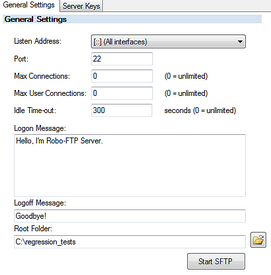
 The SFTP Server Has many settings. Generally the default is ok for these.
•Listen Address: This is the local interface to which the SFTP Server will listen.
•Port: 22 is the default for the SSH protocol over which SFTP communicates.
•Max Connections: This is the maximum allowed simultaneous connections. The default of 0 means unlimited.
•Max User Connections: This is the maximum number of allowed simultaneous connections from the same user.
•Idle Time-out: This controls how many seconds before an idle connection is dropped.
•Logon Message: This is the message that will be sent to the client before the logon prompt
•Logoff Message: This is the message sent to the client when they logoff
•Root Folder: This is the default parent folder for all users home directories. remember that users logged in to non-domain accounts will have the permissions of the user that the server is running as.
•Start / Stop SFTP: This button will display the currently available option. If the server is running you will need to stop it to change the other settings available here.