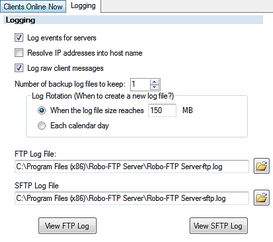
 Here you can setup the logging.
•Log events for servers: if this is checked logging is enabled.
•Resolve IP addresses into host name: this will resolve remote ip addresses when logging connection activity. this will slow connections from new clients down noticeably.
•Log raw client messages: Use this when you need to see the raw protocol activity.
•Number of back log files to keep: This control how many past logs to keep when rotating logs.
•Log Rotation: This can be done one of 2 way.
oMaximum size of a log file. This will rotate by appending a number to the log file name.
oEach calendar day. This will rotate by appending a date.
•FTP Log File: The filename used by the FTP server for logging.
•SFTP Log File: The filename used by the SFTP server for logging.