|
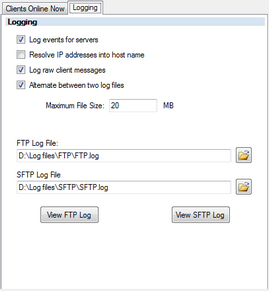 Here you can setup the logging. Here you can setup the logging.
| • | Log events for servers: if this is checked logging is enabled. |
| • | Resolve IP addresses into host name: this will resolve remote ip addresses when logging connection activity. this will slow connections down noticeably. |
| • | Log raw client messages: Use this when you need to see the raw FTP protocol activity. This will log some authentication data so you should not leave it on all the time. |
| • | Alternate between two log files: Use this to rotate between to log files. |
| • | Maximum File Size: the file size at which the log rotation moves to the next file. |
| • | Log File: The filename used by the server for logging. If using log rotation expect a _1 or _2 to be tagged on before the log file extension. |
|